
Anúncios
Creating professional video content has never been easier, thanks to teleprompter apps designed specifically for modern creators and communicators.
Whether you’re a YouTuber filming daily vlogs, a business professional recording presentations, or a social media influencer creating engaging content, reading scripts naturally on camera can be challenging. Looking down at notes or struggling to remember lines often results in awkward pauses, loss of eye contact, and multiple retakes that waste valuable time.
Anúncios
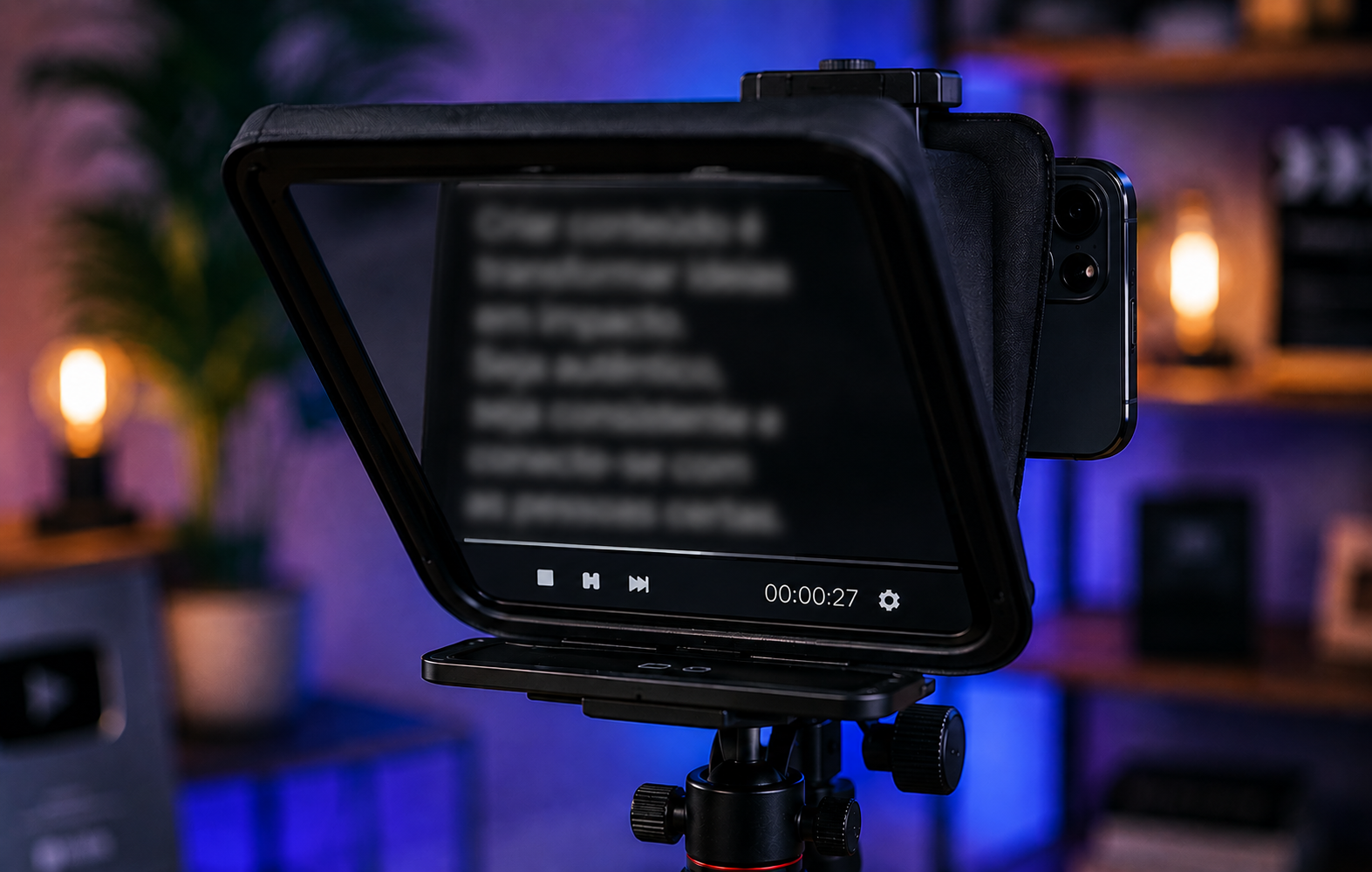
Teleprompter applications transform your smartphone or tablet into a powerful production tool, allowing you to maintain perfect eye contact with your audience while delivering flawless presentations. These innovative solutions have democratized video production, bringing Hollywood-level capabilities to anyone with a mobile device and a message to share.
📱 What Makes Teleprompter Apps Essential for Video Creators
The rise of video content across platforms like YouTube, TikTok, Instagram, and LinkedIn has created an unprecedented demand for tools that help creators produce polished, professional videos quickly and efficiently. Teleprompter apps address one of the most common challenges in video production: delivering scripted content naturally without breaking eye contact with the camera.
Anúncios
Traditional teleprompters used in television studios are expensive, bulky, and require specialized setup. Mobile teleprompter applications eliminate these barriers by turning your existing device into a fully functional prompting system. This accessibility has transformed how individuals and businesses approach video content creation.
The psychological impact of maintaining eye contact cannot be overstated. When viewers feel you’re speaking directly to them rather than reading from notes, engagement rates increase dramatically. Studies show that videos with consistent eye contact generate higher retention rates and stronger emotional connections with audiences.


🎯 Key Features That Define Quality Teleprompter Applications
Not all teleprompter apps are created equal. The best solutions incorporate specific features that enhance usability and production quality. Understanding these capabilities helps creators select the right tool for their specific needs and workflow requirements.
Adjustable Scrolling Speed and Control
Professional teleprompter apps offer precise control over scrolling speed, allowing you to match the text movement to your natural speaking pace. Advanced applications include gesture controls, Bluetooth remote compatibility, and voice-activated scrolling that automatically adjusts based on your delivery speed.
The ability to pause, reverse, or jump to specific sections during recording provides flexibility that mirrors professional studio environments. This control ensures you never rush through important points or struggle to keep up with text that moves too quickly.
Mirroring and Flip Options
When using external monitors or specialized teleprompter rigs, text mirroring becomes essential. Quality apps include horizontal and vertical flip options, ensuring your script displays correctly regardless of your setup configuration. This feature proves particularly valuable for creators using beam-splitter glass or mirror attachments.
Script Import and Management
Efficient workflow depends on seamless script management. Leading teleprompter applications support multiple import methods including direct typing, cloud storage integration (Google Drive, Dropbox, iCloud), and file format compatibility with Word documents, PDFs, and plain text files.
Organized script libraries allow you to categorize and quickly access different projects, making it simple to switch between various video topics without confusion or time-consuming setup.
🎬 How Teleprompter Apps Improve Video Production Quality
The difference between amateur and professional-looking videos often comes down to presentation confidence. Teleprompter apps directly address this quality gap by eliminating the uncertainty and memory pressure that plague many creators during recording sessions.
When you’re not worried about remembering your next line, you can focus entirely on delivery—your tone, facial expressions, energy, and connection with the camera. This mental freedom translates into more authentic, engaging performances that resonate with viewers.
Time efficiency represents another significant quality improvement. Instead of filming multiple takes to capture a perfect delivery, teleprompter users typically nail their content in one or two attempts. This efficiency doesn’t just save time; it preserves your energy and enthusiasm, resulting in more vibrant final videos.
💼 Business Applications Beyond Content Creation
While content creators represent the most visible user group, teleprompter applications serve crucial functions across diverse professional contexts. Corporate communications, educational institutions, healthcare providers, and legal professionals increasingly rely on these tools for various applications.
Corporate Training and Internal Communications
Companies producing training materials, onboarding videos, or executive communications benefit enormously from teleprompter technology. Leaders can deliver consistent messaging across multiple recordings without the variability that comes from speaking off-the-cuff or relying on memory.
This consistency ensures that important compliance information, policy updates, and procedural instructions are communicated accurately every time, reducing the risk of miscommunication or incomplete information delivery.
Educational and E-Learning Content
Educators creating online courses, lecture recordings, or instructional videos use teleprompter apps to maintain pedagogical flow while covering complex material. The ability to present detailed information accurately without constant reference to notes improves the learning experience for students.
Language instructors particularly benefit from teleprompting when demonstrating pronunciation, delivering scripted dialogues, or presenting grammatical explanations that require precise wording.
Medical and Healthcare Communications
Healthcare professionals creating patient education videos, procedural demonstrations, or telemedicine content must communicate complex information clearly and accurately. Teleprompter apps enable medical experts to deliver this critical information without error while maintaining the compassionate, direct communication patients need.
🔧 Setting Up Your Mobile Teleprompter System
Maximizing the effectiveness of teleprompter apps requires thoughtful setup and configuration. While these applications work perfectly well on standalone devices, optimizing your physical arrangement enhances comfort and production quality.
Device Positioning and Eye Line
Position your prompting device as close to your camera lens as possible. This proximity minimizes the apparent angle between where you’re reading and where the camera captures your eyes, creating the illusion of direct eye contact with viewers.
For smartphone recordings, consider mounting your prompting tablet directly above or below your recording phone. For DSLR or mirrorless camera setups, specialized teleprompter rigs place your mobile device directly in front of the lens using beam-splitter glass.
Lighting Considerations
Screen brightness affects both your visibility and the reflection in your eyes. Adjust your teleprompter display to the minimum brightness level that still allows comfortable reading. This reduces eye strain during long recording sessions and minimizes the telltale screen reflection that can appear in your pupils.
Position your key lights to illuminate your face without creating excessive glare on the teleprompter screen. Diffused, soft lighting works best for this balance.
Font Size and Formatting
Optimal readability depends on appropriate font sizing based on your distance from the screen. Most teleprompter apps allow custom font sizes—experiment to find the sweet spot where you can read comfortably without squinting or leaning toward the device.
Use clear formatting with adequate line spacing. Break longer paragraphs into shorter sections, and consider adding visual cues like bullet points or highlighted phrases to help you navigate the script naturally.
✍️ Writing Scripts Optimized for Teleprompter Delivery
The transition from written text to spoken delivery requires specific scripting techniques. Writing specifically for teleprompter reading differs significantly from creating content meant to be read silently.
Use conversational language that mirrors how you naturally speak. Written prose often contains complex sentence structures and formal vocabulary that sound stilted when spoken aloud. Read your script out loud during the writing process, adjusting any phrases that feel awkward or unnatural.
Include pronunciation guides for technical terms, names, or unusual words. Encountering an unfamiliar word mid-recording disrupts your flow and confidence. Phonetic spellings in parentheses ensure smooth delivery without hesitation.
Strategic pausing marks help maintain natural rhythm. Insert ellipses, dashes, or bracketed pause indicators where you want to breathe, emphasize points, or allow information to sink in. These visual cues translate into more dynamic, engaging delivery.
📊 Comparing Popular Teleprompter Apps
The mobile app marketplace offers numerous teleprompter solutions, each with distinct strengths and target audiences. Understanding the landscape helps you select the application best suited to your specific production needs and technical environment.
| Feature | Professional Apps | Basic Free Apps |
|---|---|---|
| Scrolling Control | Voice-activated, remote, gesture | Manual touch control |
| Script Import | Cloud integration, multiple formats | Direct typing only |
| Mirroring Options | Full horizontal/vertical flip | Limited or none |
| Recording Integration | Built-in video recording | Separate recording needed |
| Customization | Extensive font, color, spacing options | Basic settings |
Premium applications justify their cost through advanced features like integrated recording that displays prompting text while simultaneously capturing video, eliminating the need for multiple devices. Cloud synchronization ensures your scripts remain accessible across all your devices, streamlining workflow for creators who switch between tablets, phones, and computers.
🎥 Advanced Techniques for Natural Teleprompter Reading
Even with perfect technical setup, the difference between obvious script-reading and natural presentation lies in delivery technique. Professional broadcasters spend years developing skills that creators can learn and apply immediately.
The Periodic Glance Away Method
Staring continuously at the teleprompter creates an unnaturally fixed gaze. Periodically glancing away—as you would in natural conversation—adds authenticity to your delivery. Look slightly to the side during transitions between ideas or when posing rhetorical questions, then return to center for key points.
Vocal Variety and Emphasis
Reading from a teleprompter can flatten your vocal delivery if you’re not intentional about maintaining natural inflection. Mark your script with emphasis indicators, varying your pitch and energy to match the emotional content of your message rather than falling into monotone reading.
Familiarization Before Recording
Professional newsreaders review their scripts multiple times before going on air. This familiarization doesn’t mean memorization—it means understanding the content flow, identifying potential stumbling points, and internalizing the message so you’re communicating ideas rather than mechanically reading words.
🚀 Maximizing Productivity with Teleprompter Workflows
Integrating teleprompter apps into a comprehensive production workflow multiplies their value. Efficient creators develop systems that minimize setup time while maximizing output quality and consistency.
Template scripts for recurring content types save enormous time. If you produce weekly vlogs, podcast introductions, or regular product reviews, create standardized openings and closings that require only minor customization for each episode. Store these templates in your teleprompter app for instant access.
Batch recording similar content in single sessions leverages the momentum of being “in the zone.” Once your equipment is positioned and you’re comfortable with the teleprompter setup, record multiple videos on related topics rather than breaking down and rebuilding your studio for each individual piece.
Pre-production script refinement prevents mid-recording discoveries of awkward phrasing or missing information. Schedule dedicated writing time separate from recording sessions, allowing your scripts to rest before final review. Fresh eyes catch issues that disappear when you’re too close to the material.
🌟 Overcoming Common Teleprompter Challenges
Even experienced users occasionally encounter obstacles when working with teleprompter applications. Recognizing and addressing these challenges quickly keeps your production schedule on track.
The Robot Voice Problem
New teleprompter users often sound stilted or robotic because they’re concentrating on reading rather than communicating. The solution involves shifting your mental approach—imagine you’re explaining concepts to a friend rather than reading to an audience. This subtle mindset change dramatically improves naturalness.
Speed Synchronization Issues
Finding the perfect scrolling speed requires experimentation. Start slightly slower than you think necessary, as rushing creates anxiety that compounds readability problems. Many apps now offer dynamic speed adjustment that learns from your reading patterns over time.
Technical Failures Mid-Recording
App crashes, battery depletion, or connectivity issues can derail recording sessions. Always maintain backups of your scripts in multiple formats and locations. Keep backup power sources available, and consider having a printed script as an emergency failsafe for critical recordings.
💡 Creative Uses Beyond Traditional Video
Innovative creators have discovered applications for teleprompter apps that extend far beyond conventional video recording scenarios. These creative implementations demonstrate the versatility of the technology.
Live streaming benefits enormously from teleprompter support. Streamers can reference talking points, announcements, and sponsor messages without breaking eye contact with their audience or appearing to read from notes. This maintains the spontaneous feel viewers expect from live content while ensuring important information gets communicated accurately.
Podcast video recordings gain professionalism when hosts use teleprompters for introductions, sponsor reads, and episode summaries. While the conversational middle sections remain spontaneous, bookending segments with polished, scripted content elevates production quality.
Public speakers use teleprompter apps during practice sessions to internalize speeches while maintaining proper head position and eye line. This rehearsal method builds muscle memory for actual stage performance where teleprompting may not be available.
🔮 The Future of Teleprompter Technology
Emerging technologies promise to revolutionize how teleprompter apps function and integrate with broader production ecosystems. Artificial intelligence and augmented reality stand poised to transform script delivery and presentation coaching.
AI-powered applications already offer real-time delivery analysis, providing feedback on pacing, filler words, and vocal variety. Future iterations will likely include emotional tone guidance, suggesting where to increase enthusiasm or adopt a more serious demeanor based on content analysis.
Augmented reality glasses could eliminate traditional screens entirely, projecting script text directly into your field of vision while keeping your eyes perfectly aligned with camera lenses. This technology, currently in development, would create truly seamless teleprompting experiences indistinguishable from memorized delivery.
Integration with automated video editing software represents another frontier. Imagine teleprompter apps that automatically segment your recordings based on script sections, creating pre-organized clips ready for assembly in your editing timeline. This workflow integration could reduce post-production time dramatically.
🎓 Learning Resources and Community Support
The growing community of teleprompter app users has created valuable knowledge-sharing ecosystems. Engaging with these resources accelerates your learning curve and exposes you to innovative techniques developed by experienced creators.
YouTube channels dedicated to video production frequently feature teleprompter tutorials covering everything from basic setup to advanced delivery techniques. These visual guides often reveal nuances that written instructions cannot convey.
Online forums and social media groups focused on content creation provide venues for troubleshooting specific issues, sharing script templates, and discovering new applications for teleprompting technology. Active participation in these communities yields ongoing education and networking opportunities.
Many professional teleprompter apps include built-in tutorials and support documentation that goes beyond basic functionality, offering production tips and best practices developed through user feedback and professional broadcaster input.
🌈 Transforming Your Video Content Strategy
Teleprompter applications represent more than convenient production tools—they fundamentally enable content strategies that would otherwise remain impractical for individual creators and small teams. The confidence and efficiency these apps provide can transform your entire approach to video communication.
Consistency in message delivery across multiple videos becomes achievable without enterprise-level resources. Brands can ensure their value propositions, calls to action, and key messaging points receive identical emphasis in every piece of content, building stronger brand recognition and recall.
The reduced anxiety surrounding video production encourages more frequent content creation. When you’re not dreading the memory challenges and multiple retakes associated with scripted video, you’re more likely to maintain regular publishing schedules that algorithms favor and audiences appreciate.
Professional presentation quality becomes accessible to everyone, democratizing video communication in ways that benefit educators, entrepreneurs, activists, and communicators across every field. The barrier between your ideas and professional-quality video content has never been lower, and teleprompter apps play a central role in this accessibility revolution.
Whether you’re just beginning your video journey or seeking to elevate your existing content, integrating a quality teleprompter application into your workflow delivers immediate improvements in efficiency, confidence, and production quality. The investment of time learning to use these tools effectively returns dividends in every video you create, allowing your authentic voice and valuable message to shine through with clarity and professionalism.
